

 Abotts Partners with singapore based tech giant to help migrate their public sector customer from Sybase to SQL server.
 Abotts partners with NYPL to integrate with their partner libraries.
 Upworks Inc partners with ABOTTS to build their Oracle Cloud Infrastructure (OCI) and migrate their custom applications to OCI.
 Abotts Inc Partners with Gnorth consulting to deploy exadata and ODA for a large public sector customer.
Introduction
In LAS (Library Automation System), batch daemons are the backbone of automation.
They silently handle:
- Work order creation
- Item retrieval and refiling
- Status synchronization with Sierra ILS
- File-based and database-driven integrations
Most production issues around missing data in Sierra, stuck work orders, or delayed processing eventually trace back to how the LAS batch daemon works internally.
What Is an LAS Batch Daemon?
An LAS batch daemon is a long-running Progress OpenEdge program that:
- Runs continuously in the background
- Watches a directory for incoming files
- Converts files into database transactions
- Triggers downstream business logic
- Feeds data to or from Sierra
Example daemon:
btc.p (Batch System Daemon)
Once started, it never exits unless explicitly stopped.
High-Level Architecture
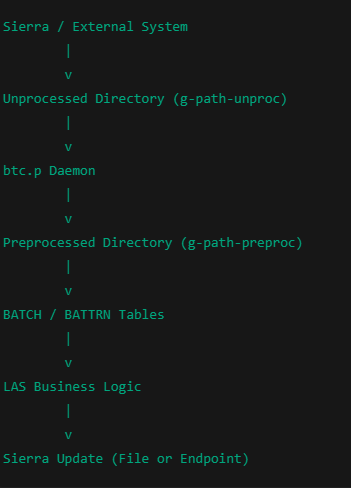
How btc.p Starts
When btc.p starts:
- It acquires a lock to ensure only one daemon runs
- Updates a control table (G0GCT)
- Marks itself as RUNNING
- Enters an infinite loop
do while true: - This means: The daemon does not “run jobs” — it watches for work.
Step 1: Watching the Unprocessed Directory
The daemon repeatedly scans:
g-path-unproc
Internally, it runs:
ls -lrt /path/unprocessed | head -2
This ensures:
- Oldest file is processed first
- Files are not partially copied
A safety delay is added:
pause 5
This avoids processing files that are still being written.
Step 2: Reading the Batch File
Each detected file is read line-by-line:
import l-field1 l-field2
Typical contents:
- Source system ID
- Work order number
- Barcode
- Action type (retrieve, refile, close)
The daemon:
- Counts valid records
- Skips malformed lines
- Extracts source information
Step 3: Assigning a Batch Transaction ID
Each batch is assigned a unique transaction number:
l-zbd-tran = next-value(batch-seq)
This becomes:
- The primary key
- The tracking ID
- The reference used across LAS
Example:
btc-key = 102345
Step 4: File State Transition (Critical Design)
LAS batch processing is state-driven, not event-driven.
File Movement Flow
unprocessed/
└── input_file.txt
↓
preprocessed/
└── bt102345.prp
Code:
os-rename unprocessed-file preprocessed-file
Why this matters:
- Prevents reprocessing
- Preserves audit trail
- Allows recovery
Step 5: Creating the BATCH Record
A database record is created:
create BATCH.
assign
btc-key = l-zbd-tran
btc-status = “PREPROC”
btc-unp-name = original filename
btc-unp-count = record count
btc-type = “REQI”.
This record becomes the source of truth for LAS.
Step 6: Loading into BATTRN (Transaction Table)
Later, another program (bttload.p) runs and:
- Reads PREPROC batches
- Breaks them into item-level transactions
- Inserts records into BATTRN
Each record represents:
- One item
- One barcode
- One action
Step 7: Business Logic Processing
LAS core programs act on BATTRN:
- Create work orders
- Update item status
- Mark items READY
- Close work orders
This is where:
- Barcodes are validated
- Locations are checked
- Errors are logged
Step 8: Sierra Integration
Once processing completes:
- Status becomes READY_FOR_SIERRA or CLOSED
- A push mechanism is triggered:
- File export or
- Endpoint-based push
If this step fails:
- Data stays in LAS
- Sierra never reflects the update