

 Abotts Partners with singapore based tech giant to help migrate their public sector customer from Sybase to SQL server.
 Abotts partners with NYPL to integrate with their partner libraries.
 Upworks Inc partners with ABOTTS to build their Oracle Cloud Infrastructure (OCI) and migrate their custom applications to OCI.
 Abotts Inc Partners with Gnorth consulting to deploy exadata and ODA for a large public sector customer.
How to Upgrade to Apache Tomcat 9.0.98 in Progress PASOE?
Apache Tomcat is a popular Java Servlet Container, and keeping it up to date ensures improved performance, stability, and security. This blog walks you through upgrading to Apache Tomcat 9.0.98 on a Linux server, taking necessary backups, and verifying the installation.
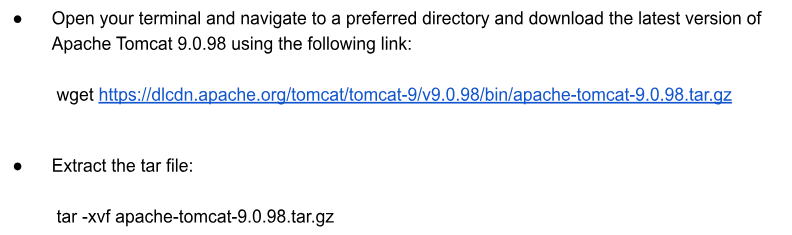
Step 1: Download and Extract Apache Tomcat 9.0.98
Step 2: Stop the Current Tomcat Service and Backup Existing Directory
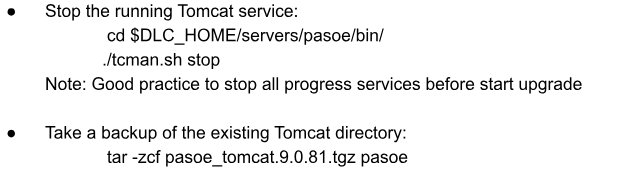
Here, pasoe is the directory of the current Tomcat instance. Ensure to name the backup file descriptively for easier identification
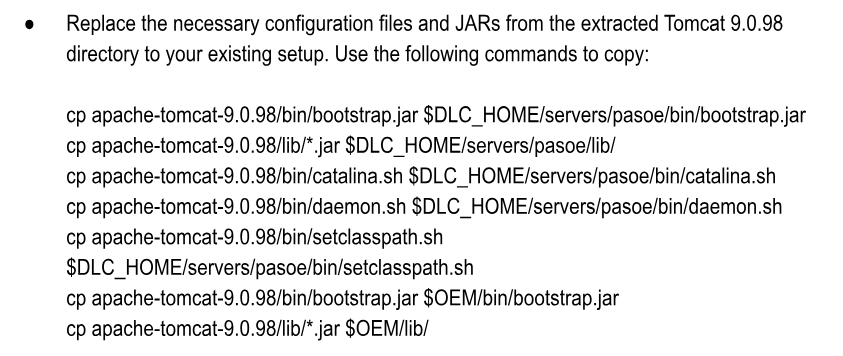
Step 3: Copy Required Configuration Files and JARs
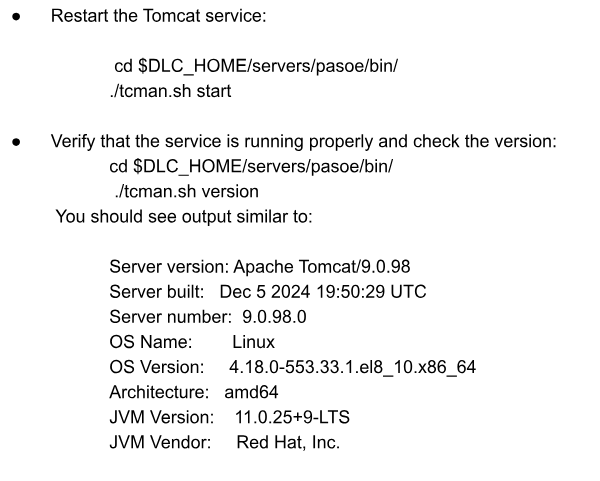
Step 4: Start the Tomcat Service
Key Points to Remember
- Always stop the Tomcat service before making changes.
- Backup the existing directory to ensure you can roll back in case of issues.
- Replace only the necessary files and maintain your custom configurations.
- Verify the Tomcat version after starting the service to ensure the upgrade was successful.
With these steps, you’ve successfully upgraded Apache Tomcat to version 9.0.98. Enjoy the benefits of the latest features and enhancements!
Official Apache Tomcat Upgrade Guide