

 Abotts Partners with singapore based tech giant to help migrate their public sector customer from Sybase to SQL server.
 Abotts partners with NYPL to integrate with their partner libraries.
 Upworks Inc partners with ABOTTS to build their Oracle Cloud Infrastructure (OCI) and migrate their custom applications to OCI.
 Abotts Inc Partners with Gnorth consulting to deploy exadata and ODA for a large public sector customer.
HashiCorp Terraform is an infrastructure as code tool that lets you define both cloud and on-prem resources in human-readable configuration files that you can version, reuse, and share. You can then use a consistent workflow to provision and manage all of your infrastructure throughout its lifecycle. Terraform can manage low-level components like compute, storage, and networking resources, as well as high-level components like DNS entries and SaaS features.
HOW TERRAFORM WORKS:
Terraform creates and manages resources on cloud platforms and other services through their application programming interfaces (APIs). Providers enable Terraform to work with virtually any platform or service with an accessible API.
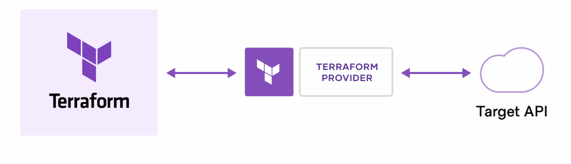
HashiCorp and the Terraform community have already written thousands of providers to manage many different types of resources and services. You can find all publicly available providers on the Terraform Registry, including Amazon Web Services (AWS), Azure, Google Cloud Platform (GCP), Kubernetes, Helm, GitHub, Splunk, DataDog, and many more.
The core Terraform workflow consists of three stages:
- Write: You define resources, which may be across multiple cloud providers and services. For example, you might create a configuration to deploy an application on virtual machines in a Virtual Private Cloud (VPC) network with security groups and a load balancer.
- Plan: Terraform creates an execution plan describing the infrastructure it will create, update, or destroy based on the existing infrastructure and your configuration.
- Apply: On approval, Terraform performs the proposed operations in the correct order, respecting any resource dependencies. For example, if you update the properties of a VPC and change the number of virtual machines in that VPC, Terraform will recreate the VPC before scaling the virtual machines.
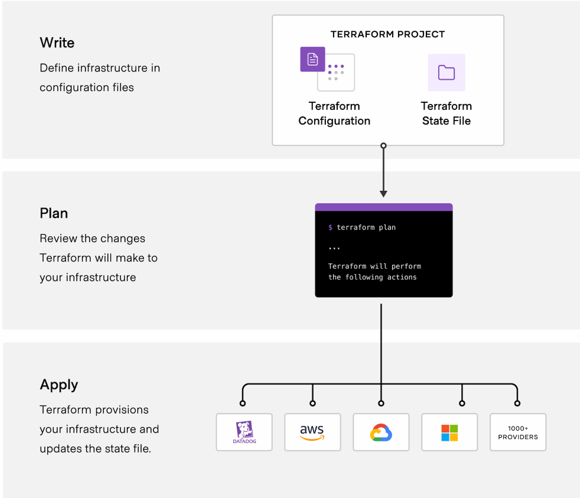
Terraform lets you define and manage your infrastructure in a consistent, repeatable way using human-readable configuration files that you can version, reuse, and share.
Manage any infrastructure
Find providers for many of the platforms and services you already use in the Terraform Registry. You can also write your own. Terraform takes an immutable approach to infrastructure, reducing the complexity of upgrading or modifying your services and infrastructure.
Track your infrastructure
Terraform generates a plan and prompts you for your approval before modifying your infrastructure. It also keeps track of your real infrastructure in a state file, which acts as a source of truth for your environment. Terraform uses the state file to determine the changes to make to your infrastructure so that it will match your configuration.
Automate changes
Terraform configuration files are declarative, meaning that they describe the end state of your infrastructure. You do not need to write step-by-step instructions to create resources because Terraform handles the underlying logic. Terraform builds a resource graph to determine resource dependencies and creates or modifies non-dependent resources in parallel. This allows Terraform to provision resources efficiently.
Standardize configurations
Terraform supports reusable configuration components called modules that define configurable collections of infrastructure, saving time and encouraging best practices. You can use publicly available modules from the Terraform Registry, or write your own.
Collaborate
Since your configuration is written in a file, you can commit it to a Version Control System (VCS) and use HCP Terraform to efficiently manage Terraform workflows across teams. HCP Terraform runs Terraform in a consistent, reliable environment and provides secure access to shared state and secret data, role-based access controls, a private registry for sharing both modules and providers, and more.
TERRAFORM ARCHITECTURE:
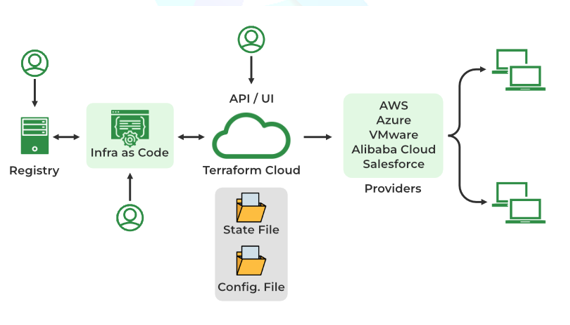
1. The Core (Engine)
This is the binary you run on your laptop. It reads your configuration files and compares them to the current state of your infrastructure to calculate what needs to be done.
2. Providers
Terraform doesn’t know how to talk to AWS or Azure directly. It uses Providers plugins that translate Terraform code into API calls for specific platforms.
- Examples: AWS Provider, Azure Provider, Kubernetes Provider.
3. State File (terraform.tfstate)
- This is the brain of Terraform. It maps your code to the real-world resources.
- If you delete a resource from your code, Terraform looks at the state file to find the ID of the real resource and delete it from the cloud.
- Note: In teams, this file is stored remotely (e.g., in an AWS S3 bucket) so everyone works off the same map.
Terraform Commands :
1. Terraform init: Initializes the working directory. ($ terraform init)
2. Terraform Plan:Creates an execution plan.
3. Terraform apply:Executes the changes.($ terraform apply)
4. Terraform destroy :Tears down everything.($ terraform destroy)
5. Terraform import: Imports an existing resource into the Terraform state, allowing it to be managed by Terraform.($ terraform import)
6. Terraform console:Opens an interactive console for evaluating expressions in the Terraform configuration. ($ terraform console)
7. Terraform refresh:This command updates the state of your infrastructure to reflect the actual state of your resources. It is useful when you want to ensure that your Terraform state is in sync with the actual state of your infrastructure.($ terraform refresh)